

Credits
Credits are the usage currency that powers AI-assisted development. Understanding how they work, the different types available, and how to manage them will help you use the platform effectively.
Earn Credits
Section titled “Earn Credits”The Earn Credits page in your account is the fastest way to top up your balance outside of buying more or upgrading your plan. Complete approved challenges, leave feedback, or invite other builders to earn bonus credits that drop straight into your account.
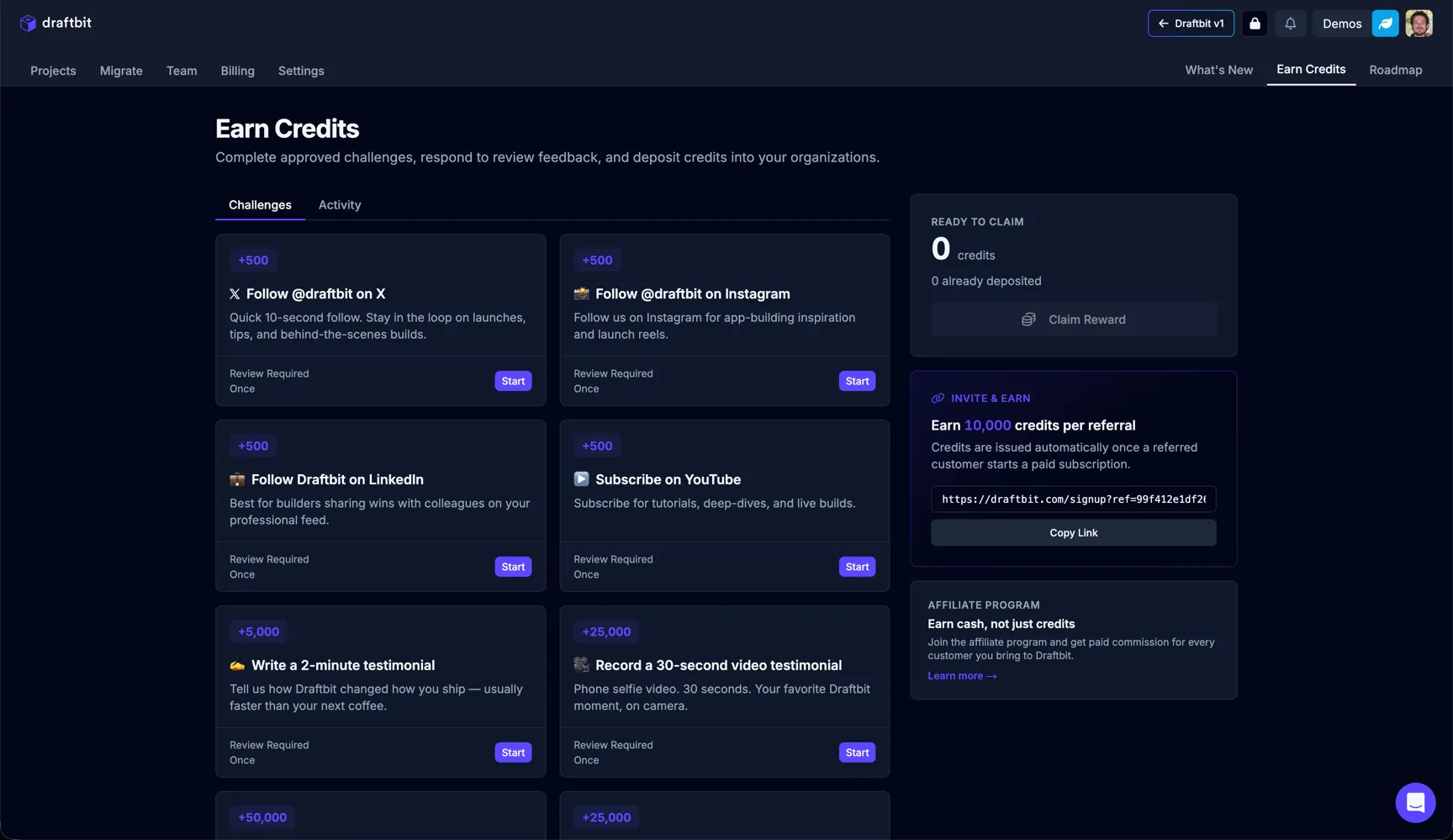
The page is split into two tabs:
- Challenges — A grid of one-time tasks you can complete to earn credits.
- Activity — A history of credits you have already earned and claimed.
When a challenge is approved, the reward shows up in the Ready to claim card on the right. Click Claim Reward to deposit those credits into your account.
| Challenge | Description |
|---|---|
| Social follows | Quick wins for following Draftbit on X, Instagram, and LinkedIn, or subscribing on YouTube. Each one is worth a fixed credit reward. |
| Video testimonials | Record a short video about your experience with Draftbit. Submissions are reviewed before credits are awarded. |
| Written feedback | Share detailed feedback or a case study about how you use Draftbit. Reviewed before credits are issued. |
| Invite a friend | Earn 10,000 credits per referral. Credits are issued automatically once a referred customer starts a paid subscription. Copy your unique referral link from the Earn Credits page. |
| Affiliate program | Earn cash, not just credits. Join the affiliate program to get paid commission for every customer who signs up through your link. |
How credits work
Section titled “How credits work”Every AI interaction consumes credits based on:
- Model cost — Different AI models have different pricing tiers
- Context size — The amount of information processed (conversation history, files, code)
- Output generated — The amount of code or text the AI produces
For detailed strategies on optimizing credit usage, see Using Credits Efficiently.
Using your own provider
Section titled “Using your own provider”Some plans and gateways let you run threads through your own provider access instead of Draftbit credits. Configure those options in Agent Config.
Supported provider paths include OpenRouter API keys, OpenAI API keys, Anthropic API keys, OpenAI subscriptions, Claude subscriptions, and Codex subscriptions.
Threads that use your own key or subscription do not consume Draftbit credits for model usage, but they are still subject to that provider’s authentication, quota, rate limit, and subscription rules. If a provider rejects a request or reaches a usage limit, Draftbit shows the provider-specific message in chat so you know where to recover.
Usage details
Section titled “Usage details”Thread usage details show credit totals and token breakdowns by model and provider. Use them to understand which runs consumed credits, which runs used your own provider, and how much context or output contributed to the cost.
Credit types explained
Section titled “Credit types explained”The platform uses three types of credits, each with different rules and renewal behaviors.
Daily credits
Section titled “Daily credits”Daily credits are a renewable allowance that resets every 24 hours.
Key characteristics:
- Reset schedule — Renew at midnight in your account timezone
- No rollover — Unused daily credits do not carry forward to the next day
- Supplementary — Designed to supplement your subscription credits for light usage
Best used for:
- Quick questions in Chat mode
- Small edits and tweaks
- Exploring features without consuming subscription credits
Subscription credits
Section titled “Subscription credits”Subscription credits are your primary credit bucket, tied to your billing plan.
Key characteristics:
- Billing cycle — Renew on your monthly or annual billing date
- Plan-based — Credit amount determined by your subscription tier
- Primary pool — Used after daily credits are exhausted
- 30-day grace period — Subscription credits expire 30 days after the end of the billing period in which they were issued. Within that window you can still spend them even if you’ve moved to a different plan.
Usage priority:
- Daily credits are used first
- Subscription credits are consumed after daily credits run out
- Bonus/grant credits are used last (if applicable)
Bonus & grant credits
Section titled “Bonus & grant credits”Bonus and grant credits are awarded through various channels outside your regular subscription.
How you receive them:
- Admin grants — Platform team awards for specific situations
- Promotional campaigns — Special offers and limited-time bonuses
- Community rewards — Contributing feedback, bug reports, or community builds
- Platform issue compensation — Credits restored when platform issues cause excess usage
Key characteristics:
- No expiration — Most bonus credits remain available until used
- Last in priority — Consumed after daily and subscription credits
- Stackable — Multiple grants accumulate in your account
For more on earning bonus credits, see Earn Credits.
Checking your credit balance
Section titled “Checking your credit balance”You can view your current credit balance and usage history in your account dashboard.
What you’ll see:
- Current balance — Available credits across all types
- Daily credits — Remaining credits until next daily reset
- Subscription credits — Credits remaining in current billing cycle
- Bonus credits — Total accumulated grants and rewards
- Usage history — Recent credit consumption by thread and model
- Breakdown by model and provider — A per‑model and per‑provider view of where your credits went (visible to all users, not just admins)
Tip: Monitor your usage patterns to identify opportunities for optimization. See Using Credits Efficiently for strategies.
Buying additional credits
Section titled “Buying additional credits”If you need more credits beyond your current plan, several options are available.
Purchase extra credits
Section titled “Purchase extra credits”You can buy one-time credit bundles that are immediately added to your account.
How it works:
- Select a credit bundle size from available options
- Credits are added to your account as bonus credits
- One-time purchase, not recurring
- Credits remain until used (no expiration)
When to buy extra credits:
- Temporary spike in usage (major feature development)
- End of billing cycle and running low
- Special project requiring more capacity
Upgrade your plan tier
Section titled “Upgrade your plan tier”Upgrading to a higher subscription tier increases your monthly credit allocation.
Benefits of upgrading:
- Higher monthly credit allowance
- Credits renew automatically each billing cycle
- Access to better models (on premium tiers)
- More cost-effective than frequent credit purchases
Upgrade process:
- Review available plan tiers in account settings
- Compare credit allocations and features
- Upgrade takes effect immediately
- Credits are prorated for current billing period
Custom plans with extra credits
Section titled “Custom plans with extra credits”For teams or users with consistently high usage, custom plans can be configured.
What’s included:
- Custom credit allocations — Set credit amounts beyond standard tiers
- Flexible billing — Monthly or annual options
- Team features — Shared credits across team members (if applicable)
Contact support to discuss:
- Your typical monthly usage patterns
- Number of team members (if applicable)
- Specific model requirements
- Budget considerations
When credits seem too high
Section titled “When credits seem too high”If you notice unexpected credit consumption or believe platform issues caused excess usage, we want to help.
What to do
Section titled “What to do”If credits feel unusually high for a task, please share the following information:
Required details:
- Thread link — Direct link to the conversation where credits were consumed
- Task description — Brief explanation of what you were trying to accomplish
- Model used — Which AI model was selected (if known)
- Preview status — Whether preview/build was failing or in error loops
- Thread length — Approximate number of messages in the thread
- Context size — Whether large files were attached or referenced
How to report:
- Use the in-app support/feedback form
- Email support with “High Credit Usage Review” in subject line
- Include your account email for follow-up
What we’ll do
Section titled “What we’ll do”When you report unexpectedly high credit usage, our team will:
Review your usage:
- Analyze the specific thread and interactions
- Check for platform-side retry loops or errors
- Identify any system issues that inflated costs
- Compare against typical usage patterns for similar tasks
Identify platform issues:
- Determine if platform bugs caused repeated attempts
- Check if preview/build failures triggered unnecessary retries
- Investigate whether system errors led to wasted credits
- Review logs for abnormal AI behavior or loops
Grant credits if confirmed:
- If platform issues are confirmed, we’ll restore the affected credits
- Credits are typically issued as bonus/grant credits
- Restoration usually happens within 1-2 business days
- You’ll receive confirmation when credits are added
Provide guidance:
- Share specific recommendations for avoiding similar issues
- Suggest workflow improvements for better efficiency
- Point to relevant documentation on credit optimization
- Offer tips for the specific scenario you encountered
Credit best practices summary
Section titled “Credit best practices summary”To make the most of your credits:
- Use the right model — Match model capability to task complexity
- Start fresh threads — Avoid long threads that accumulate context
- Be specific — Clear, scoped requests reduce back-and-forth
- Monitor usage — Check your dashboard regularly to spot trends
- Optimize workflows — Learn from high-usage patterns and adjust
For comprehensive strategies, see Using Credits Efficiently.